<?xml version="1.0" encoding="utf-8"?><feed xmlns="http://www.w3.org/2005/Atom" ><generator uri="https://jekyllrb.com/" version="3.10.0">Jekyll</generator><link href="https://cooldad.computer/feed.xml" rel="self" type="application/atom+xml" /><link href="https://cooldad.computer/" rel="alternate" type="text/html" /><updated>2026-03-01T15:37:42+00:00</updated><id>https://cooldad.computer/feed.xml</id><title type="html">Cool Dad Productions</title><subtitle>Weird little coding projects from cooldad.computer</subtitle><author><name>Cole Strode</name></author><entry><title type="html">Pick Me</title><link href="https://cooldad.computer/2026/02/24/pick-me.html" rel="alternate" type="text/html" title="Pick Me" /><published>2026-02-24T12:00:00+00:00</published><updated>2026-02-24T12:00:00+00:00</updated><id>https://cooldad.computer/2026/02/24/pick-me</id><content type="html" xml:base="https://cooldad.computer/2026/02/24/pick-me.html"><![CDATA[<h2 id="pick-me-slowing-the-growth-of-my-tbr">Pick Me: Slowing the growth of my TBR</h2>

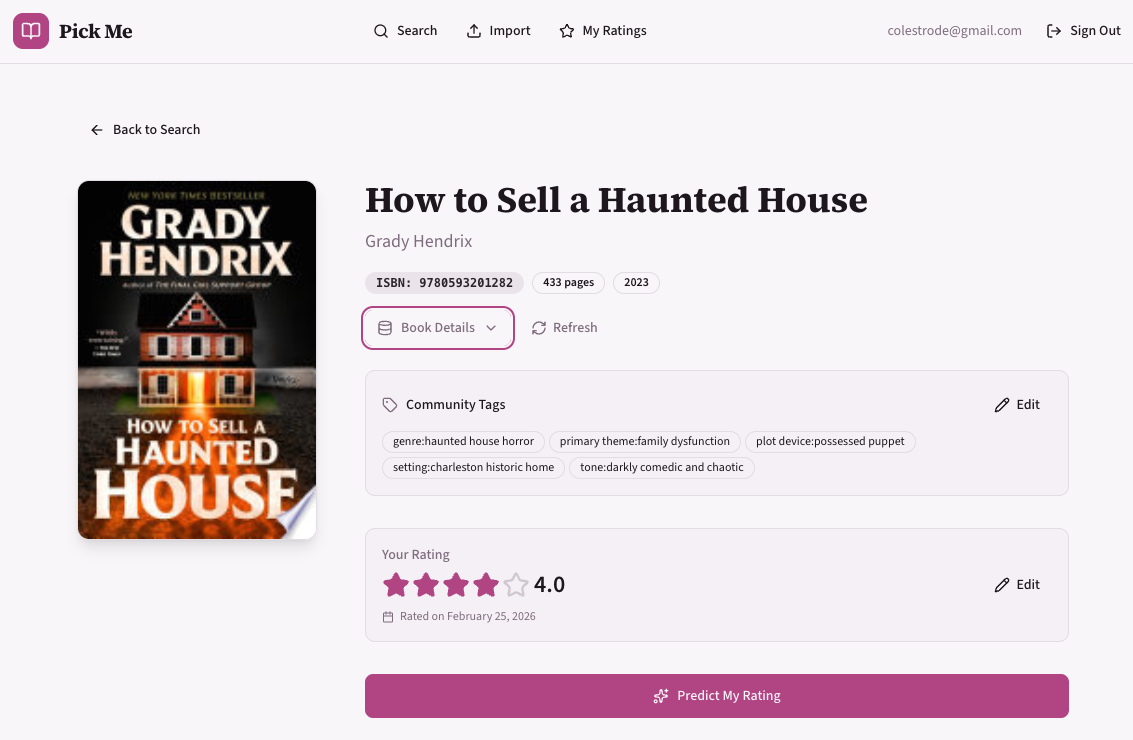
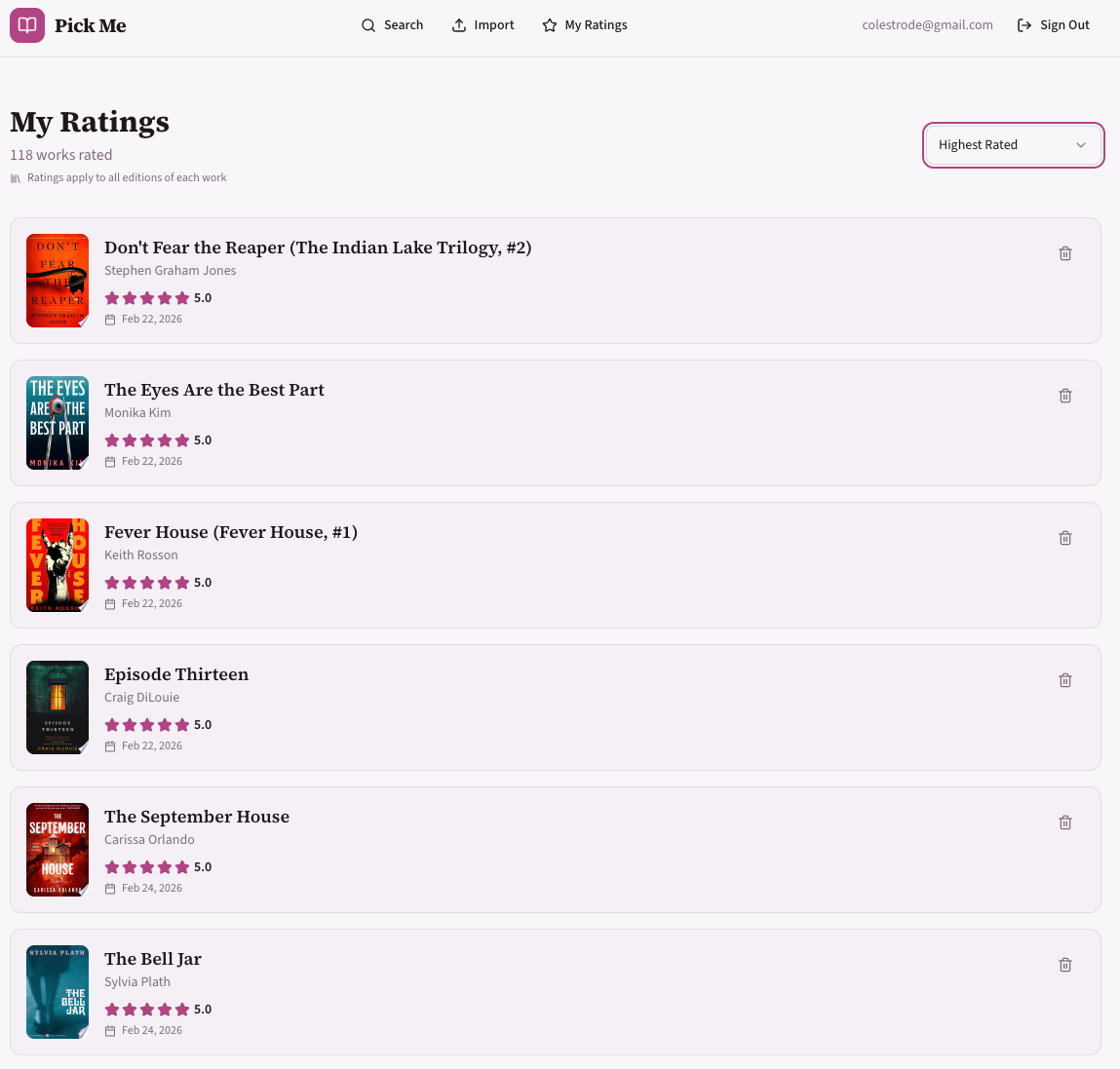
<p>Every time I go to a bookstore, I pick up five different books. But which one will I like the most? This project will help me responsibly slow the growth of my TBR stack by estimating the rating I would give each book, using my own reading history as a data source.</p>

<p>NOTE: sign ups are disabled to keep my costs down ;)</p>

<p><a href="https://pick-me.cooldad.computer"><img src="/assets/images/pick-me/pick-me-square_320x320.png" alt="Pick Me" /></a></p>

<h2 id="learning-goals">Learning Goals</h2>
<ul>
  <li>Create a new project from scratch, no templates</li>
  <li>Lean heavily on coding assistants, in particular Every’s <a href="https://github.com/EveryInc/compound-engineering-plugin/">compound learning</a> Claude plugin</li>
  <li>Create a web-accessible site to solve a real problem I have</li>
</ul>

<h2 id="links">Links</h2>
<ul>
  <li><a href="https://github.com/Cool-Dad-Productions/pick-me">Repo</a></li>
  <li><a href="https://pick-me.cooldad.computer/">Site</a></li>
</ul>

<h2 id="stacktooling">Stack/Tooling</h2>
<ul>
  <li>ChatGPT for initial project plan</li>
  <li>Every’s Compound Engineering plugin</li>
  <li>V0 for UX design and iterations</li>
  <li>Claude Code VSCode plugin</li>
  <li>Postgres (hosted on Neon)</li>
  <li>Vercel for deploys and hosting</li>
  <li>Typescript</li>
  <li>Next.js for routing (front and backend)</li>
  <li>ngrok for local tunneling, used for local mobile testing</li>
  <li>OpenLibrary for most book data</li>
  <li>Google Books for additional book data</li>
</ul>

<h2 id="main-takeaways">Main Takeaways</h2>

<p>The compound engineering plugin is token hungry, but I’m very impressed by the thoroughness of it’s planning capabilities.</p>

<p>The key skill of a software developer is expressing intent.</p>

<p>Curiosity will increasingly become the key quality that helps engineers grow in their career.</p>

<h2 id="reflections">Reflections</h2>

<p>My primary goal for this project was to lean heavily into modern AI-driven coding workflows. As the landscape has shifted significantly since I was a full-time developer, I wanted to push these tools to their edges—identifying what works, what breaks, and where the “diminishing returns” begin. Understanding these boundaries helps me discern when to step in manually versus when to rely on an agent.</p>

<h3 id="the-stack--ui-scaffolding">The Stack &amp; UI Scaffolding</h3>

<p>The power of V0 was impressive. I used Claude to build the initial scaffold and establish the API. This workflow is a bit backward for a UI-first tool like v0, but it worked well. I used Claude to meta-prompt the instructions for v0 once the skeleton app existed. I think having a skeleton built helped me get better clarity about my UI needs, which made working with V0 much more efficient. Clear API boundaries helped as well.</p>

<p>After some minor tweaking in v0, the initial UI was very close to what I wanted. I was able to lift the UI files directly into my codebase and then had Claude work page-by-page to integrate the backend logic. Interestingly, once a UI paradigm was established, adding new features in that style became trivial; I could iterate directly in the code with Claude without returning to v0.</p>

<h3 id="workflow-orchestration">Workflow Orchestration</h3>

<p>I leaned heavily on Every’s <a href="https://github.com/EveryInc/compound-engineering-plugin/">Compound Learning</a> plugin for Claude. While the plugin can be triggered via slash commands, I found it difficult to recall the precise sequence of the workflow. However, I discovered that if I simply instructed Claude to <em>use</em> the plugin, it would intelligently select the correct step, removing the cognitive load of manual invocation. One minor friction point: I still had to explicitly prompt it to record learnings; I’d prefer for that “memory” function to be more autonomous.</p>

<h3 id="the-planning-first-paradigm">The Planning-First Paradigm</h3>

<p>Putting 80% of the effort into the planning phase paid off, but it highlighted a specific risk: AI agents suffer from the same “author validation” and pliancy as LLMs. If I proposed a flawed architectural path, the agent often gladly followed me down the rabbit hole, requiring painful unwinding later.</p>

<p>I found the most success by outlining outcomes and constraints, then letting Claude perform the research. This reinforces my belief that the core key skill of an engineer is expressing intent whether to a compiler, an agent, or a human reader. Clearer intent invariably leads to more resilient solutions.</p>

<h3 id="the-cost-of-context">The Cost of Context</h3>

<p>A planning-focused workflow is significantly more “token-hungry” than a code-focused one. This makes sense to me in retrospect: generating comprehensive documentation and architectural specs produces more output tokens than most code changes. I found myself aggressively monitoring token usage and scheduling development around Anthropic reset windows. To mitigate this, I began leveraging multiple sources: using ChatGPT to define the problem space and research best practices, before moving to Claude for the specific implementation.</p>

<h3 id="the-trust-gap-and-prompt-reviewer-bias">The Trust Gap and “Prompt-Reviewer” Bias</h3>

<p>Offloading so much labor to an agent introduces a dangerous level of “rubber-stamping.” It is incredibly easy to approve a PR without inspecting the logic or testing the edge cases. This is a classic resiliency issue caused by automation: the more automation leads to a decay in system knowledge by operators, ultimately making the system less safe and more difficult to operate.</p>

<p>We need to bring a healthy skepticism to every change. In traditional engineering, we say an author shouldn’t review their own code. We need a new corollary: you should not review a change that you prompted. In both cases, your assumptions and blind spots are already baked into the intent you expressed.</p>

<p>Curiosity will be a help mitigate some of these issues.</p>

<h3 id="compliance-and-control">Compliance and Control</h3>

<p>During long sessions, the required approvals becomes a bottleneck. It is tempting to grant agents greater autonomy, but the part of me that has worked with enterprise compliance shudders at the thought. This feels like the next generation of the “should developers have prod DB access?” debate. This may also be operator error, maybe there are better permission settings I could leverage. This may also be a tooling issue, I’m interested in using <a href="https://github.com/snarktank/ralph/tree/main">Ralph</a> for a fully hands off development experience.</p>

<h3 id="the-data-hurdle">The Data Hurdle</h3>

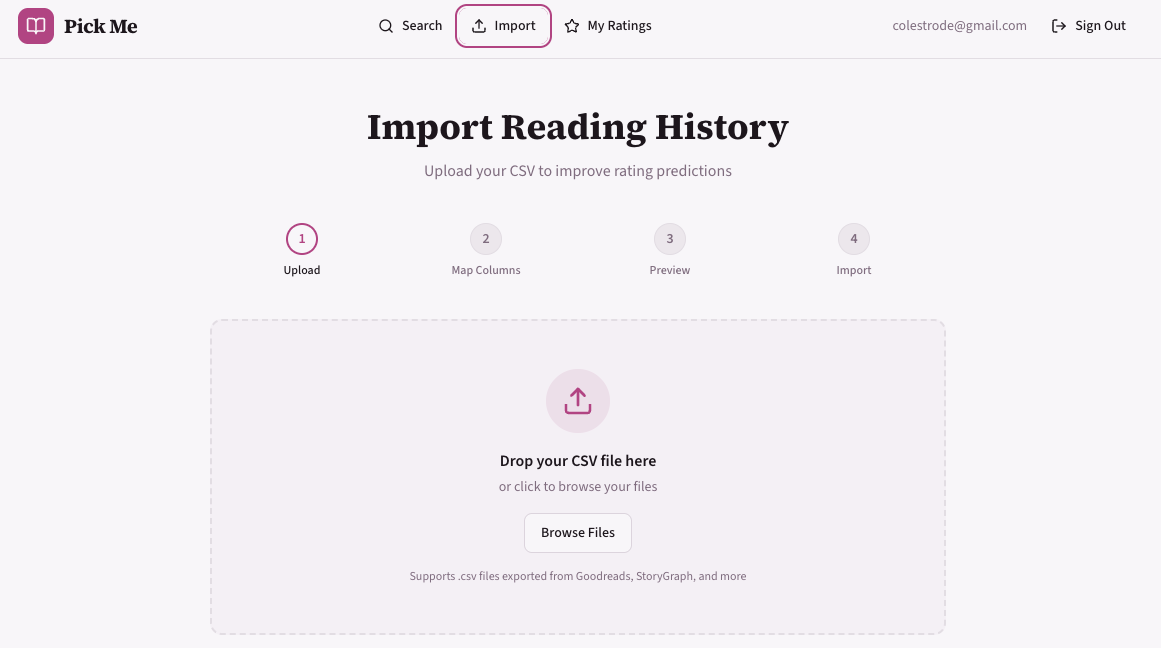
<p>In the end, I built exactly what I set out to create, but the biggest hurdle remains data. Finding high-quality, free sources for book genres and themes is difficult. I eventually settled on a manual AI enrichment pipeline:</p>

<ol>
  <li>Export data from Goodreads.</li>
  <li>Batch the data into 20-row increments.</li>
  <li>Use a Custom GPT to annotate the books with “community tags.”</li>
  <li>Upload the enriched data into the app.</li>
</ol>

<p>While not a scalable solution, it was “good enough” for a hobby project. However, it has me thinking about future iterations involving more sophisticated data pipelines, perhaps exploring vector encoding and ANN (Approximate Nearest Neighbor) search capabilities.</p>

<p>While this workflow got me good data on an individual book level, the tags didn’t have a fixed taxonomy, which reduces the accuracy of matching. I think I’ll return to this project in the future to improve on this part of the workflow.</p>

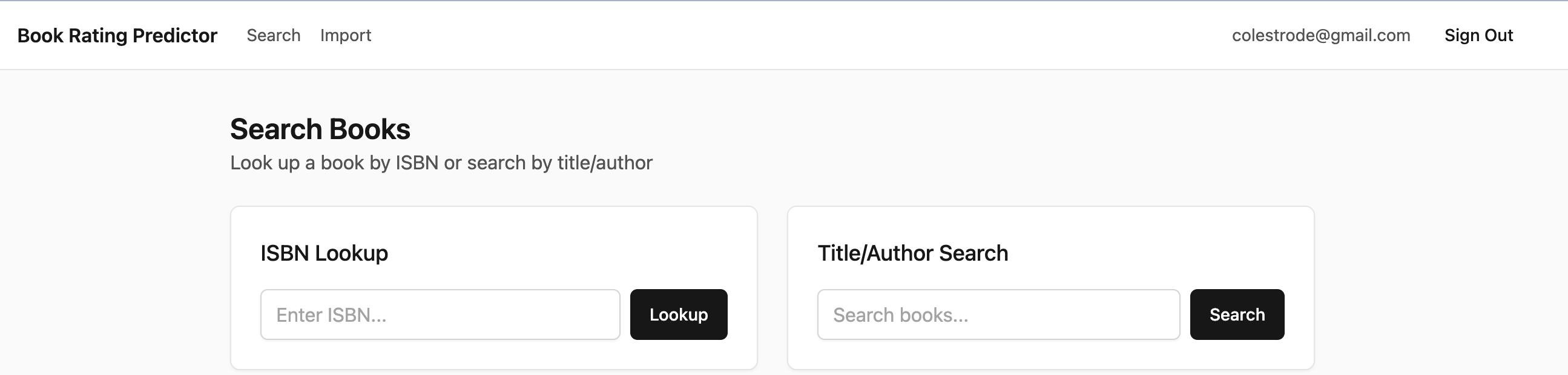
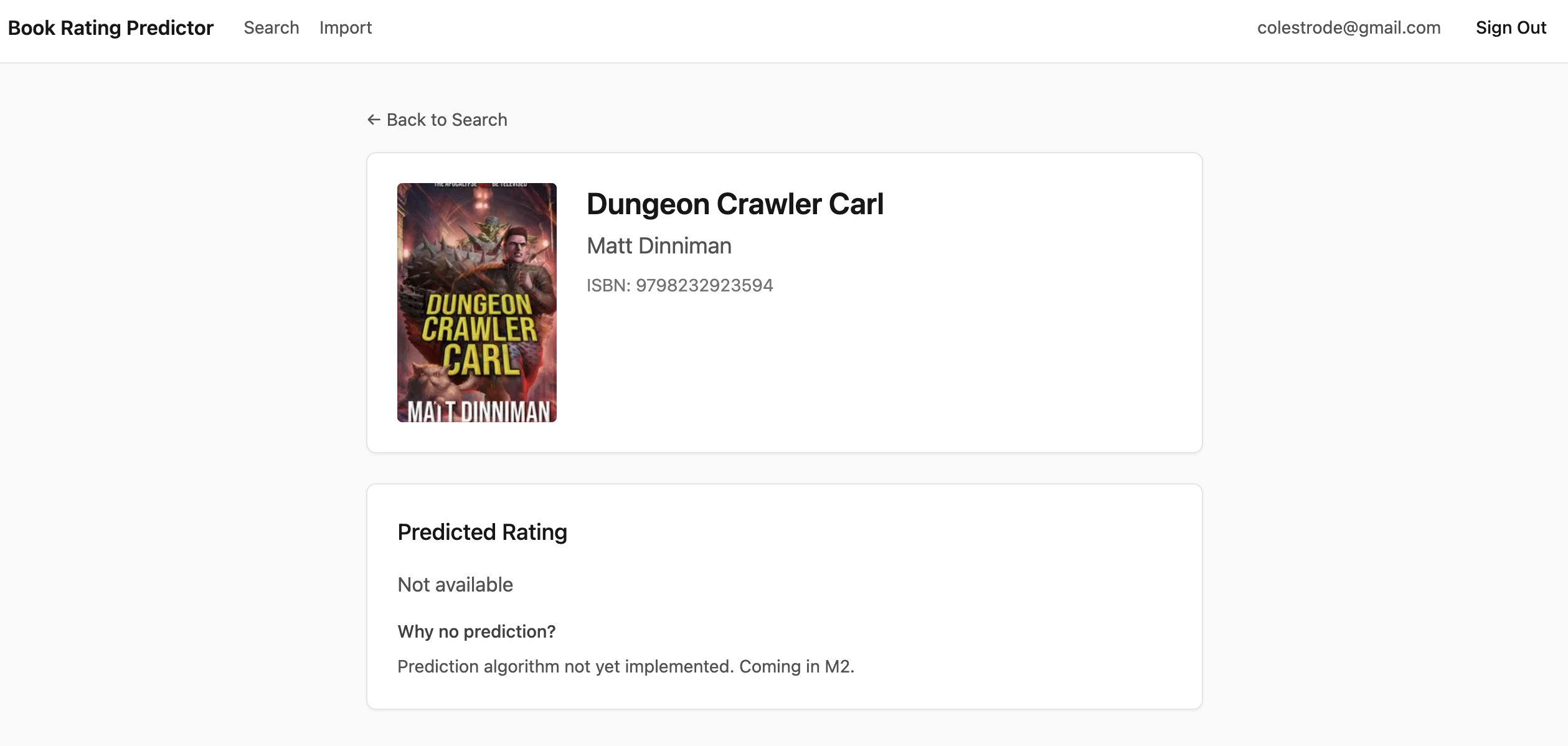
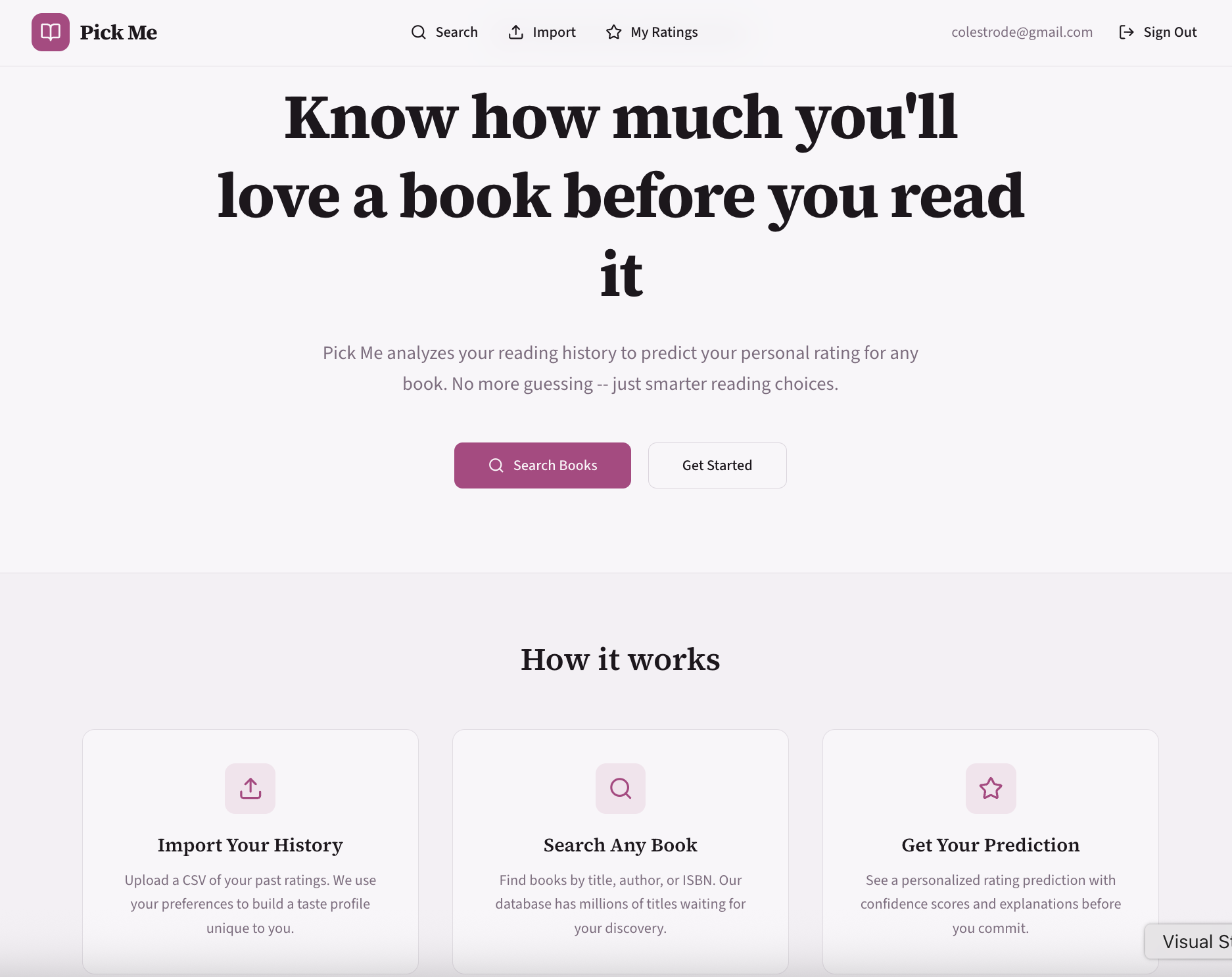
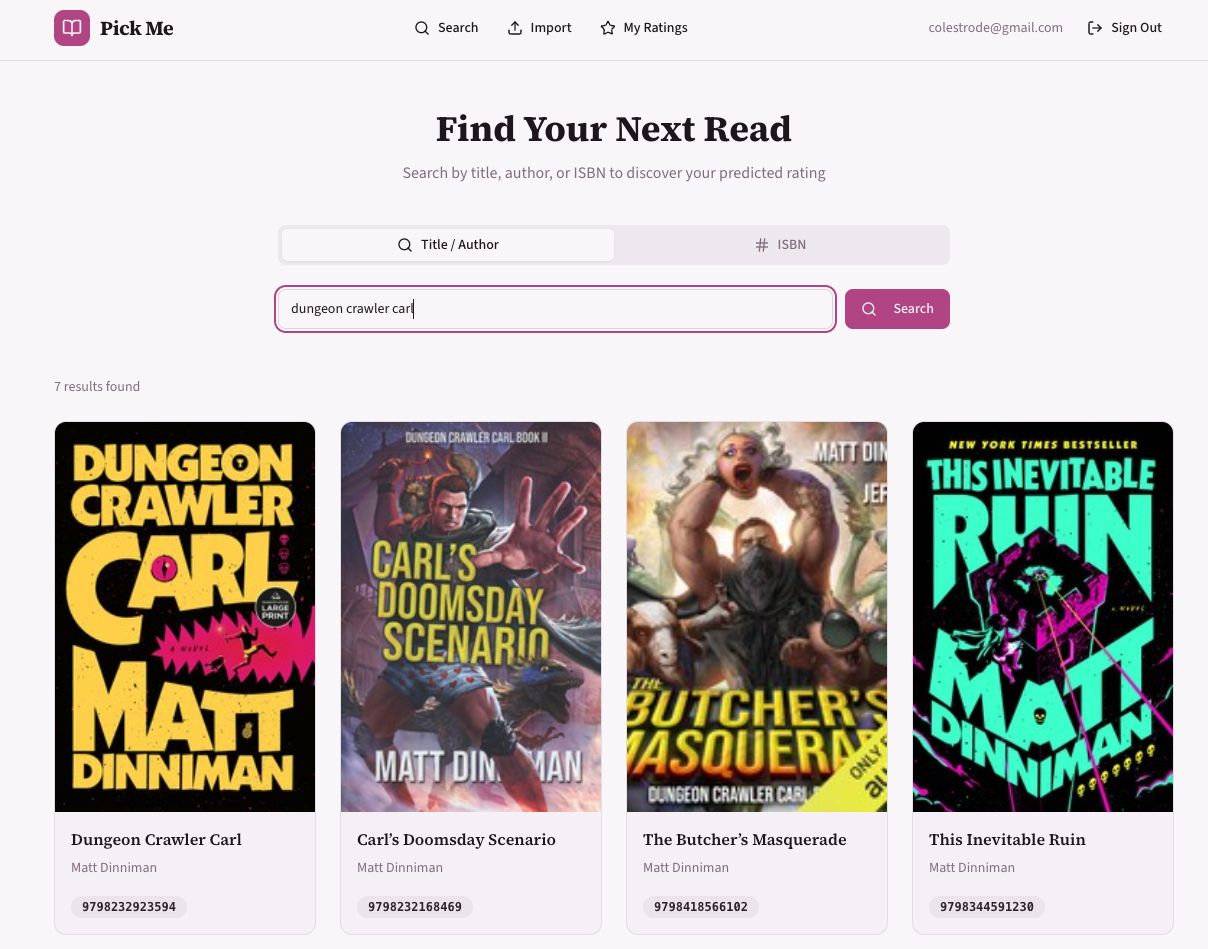
<h2 id="screenshots">Screenshots</h2>

<div class="gallery">
  
  <figure class="gallery-item">
    <img src="/assets/images/pick-me/initial_landing.png" alt="Initial landing page" loading="lazy" />
    
    <figcaption>Initial landing page</figcaption>
    
  </figure>
  
  <figure class="gallery-item">
    <img src="/assets/images/pick-me/initial_detail.png" alt="Initial book detail view" loading="lazy" />
    
    <figcaption>Initial book detail view</figcaption>
    
  </figure>
  
  <figure class="gallery-item">
    <img src="/assets/images/pick-me/updated_landing.png" alt="Updated landing page after V0 redesign" loading="lazy" />
    
    <figcaption>Updated landing page</figcaption>
    
  </figure>
  
  <figure class="gallery-item">
    <img src="/assets/images/pick-me/updated_search.png" alt="Updated search interface" loading="lazy" />
    
    <figcaption>Updated search</figcaption>
    
  </figure>
  
  <figure class="gallery-item">
    <img src="/assets/images/pick-me/updated_detail.png" alt="Updated book detail with predicted rating" loading="lazy" />
    
    <figcaption>Updated book detail</figcaption>
    
  </figure>
  
  <figure class="gallery-item">
    <img src="/assets/images/pick-me/updated_ratings.png" alt="Ratings page" loading="lazy" />
    
    <figcaption>Ratings page</figcaption>
    
  </figure>
  
  <figure class="gallery-item">
    <img src="/assets/images/pick-me/updated_import.png" alt="Goodreads import flow" loading="lazy" />
    
    <figcaption>Goodreads import</figcaption>
    
  </figure>
  
</div>

<div class="lightbox" id="gallery-lightbox" role="dialog" aria-modal="true" aria-label="Image viewer">
  <button class="lightbox-close" aria-label="Close image viewer">
    <i class="fa-solid fa-xmark"></i>
  </button>
  <button class="lightbox-prev" aria-label="Previous image">
    <i class="fa-solid fa-chevron-left"></i>
  </button>
  <img class="lightbox-img" src="" alt="" />
  <button class="lightbox-next" aria-label="Next image">
    <i class="fa-solid fa-chevron-right"></i>
  </button>
  <p class="lightbox-caption"></p>
</div>

<script>
(function () {
  var lightbox = document.getElementById('gallery-lightbox');
  if (!lightbox) return;

  var lightboxImg    = lightbox.querySelector('.lightbox-img');
  var lightboxCap    = lightbox.querySelector('.lightbox-caption');
  var closeBtn       = lightbox.querySelector('.lightbox-close');
  var prevBtn        = lightbox.querySelector('.lightbox-prev');
  var nextBtn        = lightbox.querySelector('.lightbox-next');
  var items          = Array.from(document.querySelectorAll('.gallery-item'));
  var currentIndex   = 0;

  function open(index) {
    currentIndex = index;
    update();
    lightbox.classList.add('is-open');
    document.body.style.overflow = 'hidden';
    closeBtn.focus();
  }

  function close() {
    lightbox.classList.remove('is-open');
    document.body.style.overflow = '';
  }

  function update() {
    var item       = items[currentIndex];
    var img        = item.querySelector('img');
    var figcaption = item.querySelector('figcaption');

    lightboxImg.src = img.src;
    lightboxImg.alt = img.alt;

    if (figcaption) {
      lightboxCap.textContent = figcaption.textContent;
      lightboxCap.hidden = false;
    } else {
      lightboxCap.hidden = true;
    }

    prevBtn.disabled = currentIndex === 0;
    nextBtn.disabled = currentIndex === items.length - 1;
  }

  items.forEach(function (item, index) {
    item.addEventListener('click', function () { open(index); });
  });

  closeBtn.addEventListener('click', close);

  prevBtn.addEventListener('click', function () {
    if (currentIndex > 0) { currentIndex--; update(); }
  });

  nextBtn.addEventListener('click', function () {
    if (currentIndex < items.length - 1) { currentIndex++; update(); }
  });

  // Close when clicking the backdrop (not the image or controls)
  lightbox.addEventListener('click', function (e) {
    if (e.target === lightbox) close();
  });

  document.addEventListener('keydown', function (e) {
    if (!lightbox.classList.contains('is-open')) return;
    if (e.key === 'Escape') { close(); return; }
    if (e.key === 'ArrowLeft'  && currentIndex > 0)                  { currentIndex--; update(); }
    if (e.key === 'ArrowRight' && currentIndex < items.length - 1)   { currentIndex++; update(); }
  });
})();
</script>

<div class="video-container">
  <iframe src="https://www.youtube.com/embed/CyQKNFXFKnE" title="Pick Me user interaction demo" frameborder="0" allow="accelerometer; autoplay; clipboard-write; encrypted-media; gyroscope; picture-in-picture" allowfullscreen="">
  </iframe>
</div>]]></content><author><name>Cole Strode</name></author><category term="books," /><category term="llm" /><summary type="html"><![CDATA[Slowing the growth of my TBR]]></summary></entry><entry><title type="html">cooldad.computer</title><link href="https://cooldad.computer/2026/02/08/cooldad-computer.html" rel="alternate" type="text/html" title="cooldad.computer" /><published>2026-02-08T12:00:00+00:00</published><updated>2026-02-08T12:00:00+00:00</updated><id>https://cooldad.computer/2026/02/08/cooldad-computer</id><content type="html" xml:base="https://cooldad.computer/2026/02/08/cooldad-computer.html"><![CDATA[<h2 id="cooldadcomputer-youre-looking-at-it">cooldad.computer: You’re looking at it!</h2>

<p>A few weeks ago, I bought some t-shirts from an online store. I would get free shipping with a third shirt, so I found a brown shirt with “Cool Dad” embroidered across the front. It seemed just dorky and ironic enough to get the appropriate eye roll from my twelve year old.</p>

<p>But when it arrived, I realized the actual product was just cheap vinyl letters. The shirt quickly went from quirky dorky to straight bad-taste dorky. (The other two shirts were spot on perfect, so 2 out of 3 ain’t bad.)</p>

<p>My wife and daughter also pointed out buying a shirt that said “Cool Dad” for myself was weird. Fair point!</p>

<p>At the same time, I’ve been spending time building some side projects and I realized I wanted to capture my thoughts about what I learned. This helps me stay focused and iterate quickly on what I’m learning. I also wanted to push myself to learn in public.</p>

<p>I needed a way to rescue the Cool Dad shirt debacle and meet these learning goals. I spun up a Github pages site and used the shirt as the basis for the styling. And so <a href="https://cooldad.computer">cooldad.computer</a> was born! I don’t think this helps me recover from the awful shirt purchase, it just digs me deeper, but as a learning tool I’ve been very happy!</p>

<h2 id="learning-goals">Learning Goals</h2>
<ul>
  <li>Capture learnings from my side projects and feed those back into future projects</li>
  <li>Keep track of all these projects</li>
  <li>Give myself a place to experiment and learn without constraints</li>
</ul>

<h2 id="links">Links</h2>
<ul>
  <li><a href="https://github.com/Cool-Dad-Productions/cool-dad-site">Repo</a></li>
  <li><a href="https://cooldad.computer/">Site</a></li>
</ul>

<h2 id="stacktooling">Stack/Tooling</h2>
<ul>
  <li>Github pages for hosting</li>
  <li>SASS styling</li>
  <li>Font Awesome for icons</li>
  <li>Favicon.io for favicon generation</li>
  <li>Google Tag Manager for analytics</li>
  <li>ChatGPT for initial styling</li>
  <li>Claude Code for style guide, style, and other updates</li>
  <li><a href="https://github.com/b2a3e8/jekyll-theme-console">jekyll-theme-console</a> for base theme</li>
</ul>

<h2 id="main-takeaways">Main Takeaways</h2>

<p>Github Pages continues to be my favorite way to spin up a static site. There may be better options, but having a chosen platform reduces barriers to starting projects.</p>

<p>Claude did well with my prompts that instructed it to iterate until a quality metric was hit. This was like dipping a toe into some more complex iterative workflows like <a href="https://github.com/snarktank/ralph">Ralph</a>.</p>

<h2 id="relevant-prompts">Relevant Prompts</h2>

<p>These were the Claude prompts used to pick a Jekyll template and generate a style guide.</p>

<h3 id="picking-a-theme">Picking a theme</h3>

<div class="language-plaintext highlighter-rouge"><div class="highlight"><pre class="highlight"><code>I am a software engineer and I have the domain cooldad.computer.
I want to host a personal portfolio site of side projects at this domain
using Github Pages. The projects I make are one off coding projects.
They are usually whimsical and are purpose built to help me learn or
to test a new technology or approach.

I need a template for this site. I'd like to use something free.

Constraints:
* The template should be free
* The tone should be whimsical, but keep with an ironic
technology/computer/nerd aesthetic.
* the site will be hosted on Github pages
* I am comfortable making basic styling changes (colors, fonts, images),
but don't want to spend a lot of time rewriting the template to make it work
* The logo I use has a primary background color of #6B4A3A, font color
of #CFEFF2, and uses the Libre Baskerville font (regular 400 normal)

You are a senior designer with 10 years experience designing websites.
I am enlisting your help with picking the initial them. 

 I want you to explain my use case, tell me how you will evaluate templates,
 and tell me how you will find them. Once you have a plan, then I want
 you to find 5 templates, evaluate them using your criteria, and sort
 them from best to worst. Provide a bulleted summary with each template
 explaining how it fared in the evaluation.
</code></pre></div></div>

<h3 id="developing-a-style-guide">Developing a style guide</h3>

<div class="language-plaintext highlighter-rouge"><div class="highlight"><pre class="highlight"><code>ok, after weighing all the options, I'm going to start with the first
option: "Jekyll Theme Console". This may be minimal, but it's a good
start for a lightweight afternoon project. 

Next I will need you as a Senior Designer to create a style guide for me.

First tell me how you would evaluate a style guide for a portfolio site.
Tell me what topics should exist should be covered. Then create an outline
of a style guide and ask me for feedback. Once we agree on the outline, 
I want you to populate the style guide with your proposed styling.

Next, I want you to evaluate your style guide using your criteria on a
scale of 1 to 100, with 100 being perfect and 1 being completely undesirable.
If your score is below 90, create and execute a plan to correct it.
Continue this until the style guide evaluation is above 90. 

Finally, print the final style guide in markdown format.

Some existing assets:
* I attached a jpeg that can be the basis of the style guide
* the logo background color is #6B4A3A
* the logo font color is #CFEFF2
* the font is "Libre Baskerville font (regular 400 normal)"
</code></pre></div></div>

<h2 id="reflections">Reflections</h2>

<p>I’ve spun up a few Github Pages sites, so choosing that as a platform was an easy choice. I leaned heavily on AI for creating style guides and styling the site itself. I included some of the most relevant prompts above.</p>

<p>I set up apex domain routing and a <code class="language-plaintext highlighter-rouge">cname</code> for the <code class="language-plaintext highlighter-rouge">www</code> subdomain. Github documents this well; it was a simple copy-paste. Setting up other project-specific subdomains is trivial and doesn’t interfere with the apex DNS settings.</p>

<p>I used <a href="https://github.com/b2a3e8/jekyll-theme-console">jekyll-theme-console</a> as the template. I decided to fork instead of installing the theme, since this gives me more control over styling and implementation. However, I have a terrible habit of accidentally creating PRs against the upstream when I just want to commit to my own repo. Given how much I’ll adapt this theme to my own needs, I don’t care about getting changes from the upstream or contributing back. So I disconnected from the fork tree. PR problem solved!</p>

<p>The style guide approach I took is a great pattern for apps and sites built with AI. It creates a human readable, but structured natural language definition of styling that coding agents can consume and conform to. This is a pattern I want to extend into other areas of code.</p>

<p>I created a Claude skill to add new pages. In the past, I’ve created bash scripts to do this, but wanted to experiment. Obviously this creates vendor lock in, though it would be easy to convert the skill to some other markdown based AI interface.</p>

<p>I do worry a bit about usage/token consumption with this skill approach. I think my next step will be to create a well documented bash script, that way Claude just needs to know the interface and execute the script. Properly done, that should reduce token usage a bit. After all, <a href="https://tidyfirst.substack.com/p/tokens-the-new-oil">tokens are the new oil</a>.</p>]]></content><author><name>Cole Strode</name></author><category term="static-site," /><category term="jekyll," /><category term="github-pages" /><summary type="html"><![CDATA[You're looking at it!]]></summary></entry><entry><title type="html">Mordecai</title><link href="https://cooldad.computer/2026/01/30/mordecai.html" rel="alternate" type="text/html" title="Mordecai" /><published>2026-01-30T12:00:00+00:00</published><updated>2026-01-30T12:00:00+00:00</updated><id>https://cooldad.computer/2026/01/30/mordecai</id><content type="html" xml:base="https://cooldad.computer/2026/01/30/mordecai.html"><![CDATA[<h2 id="mordecai-dungeon-guide-meets-llms">Mordecai: Dungeon Guide meets LLMs</h2>

<p>Imagine an AI chat bot that was also a world weary, grizzled dungeon guide. All you need is Princess Donut by your side and you’re ready to take down the Syndicate from the inside in the relative comfort of your heart covered <a href="https://mattdinniman.com/books/dungeon-crawler-carl/">boxer shorts</a>.</p>

<p><a href="https://mordecai.cooldad.computer"><img src="/assets/images/mordecai.png" alt="Mordecai" /></a></p>

<h2 id="learning-goals">Learning Goals</h2>
<ul>
  <li>Understand the current landscape of tooling in the Javascript world</li>
  <li>Get something up and running as fast as possible</li>
  <li>Create a person LLM chatbot in a custom tone and style</li>
</ul>

<h2 id="links">Links</h2>
<ul>
  <li><a href="https://github.com/Cool-Dad-Productions/mordecai">Repo</a></li>
  <li><a href="https://mordecai.cooldad.computer/">Site</a></li>
</ul>

<h2 id="stacktooling">Stack/Tooling</h2>
<ul>
  <li>Typescript</li>
  <li>React</li>
  <li>Next.js for routing</li>
  <li>Postgres, hosted on Neon</li>
  <li>Built/deployed on Vercel</li>
  <li>Vercel AI Gateway as an LLM proxy</li>
  <li>Claude Code VS Code extension</li>
  <li>Gemini for image creation, prompt engineering</li>
</ul>

<h2 id="main-takeaways">Main Takeaways</h2>

<p>Modern JS tooling is very good, even the rough edges are smoother than they were.</p>

<p>Structured natural language is the new API. This deserves more thought and experimentation.</p>

<h2 id="reflections">Reflections</h2>

<p>I used to build a lot of Slack chatbots back in the day, so an LLM chat UI seemed like a good first project.</p>

<p>My goal was to get something live as fast as possible, so I used a Next.js starter project. I got this up and running on Vercel pretty quickly.</p>

<p>A lot of what I found reminds me of webdev from the late 2010s with better ergonomics. Typescript is fully first class, Vercel gives an mature UI experience without sacrificing the CLI, DB hosting with Neon was a breeze to set up.</p>

<p>I used Gemini to generate the logo. I used that logo to have Claude generate a markdown style guide for me. It took a few iterations, but once the style guide was in a good place, I could use Claude Code make the styling updates I wanted. This was a pretty easy process with a bit of back and forth. The resulting style updates were written back to the style guide for future reference. I am intrigued with structured natural language as an API. This is something I want to think more about.</p>

<p>Editing tone of the LLM was easy, the system prompt was stored in it’s own file. I used meta-prompting with Gemini to get the voice right. This was a process I’ve used with custom GPTs, which is essentially what this project is.</p>

<p>Vercel’s AI Gateway was a nice abstraction to work with. It was easy to choose the models the user has access to. An AI gateway like this seems like a great way to do quality checks across models and providers. I’m interested in LLM quality testing, so I want to come back to this.</p>

<p>I like that Javascript APIs and frameworks have evolved to the point that they work more seamlessly between front and backend development. Using the same framework (Next.js) and native the <code class="language-plaintext highlighter-rouge">fetch</code> API along with native <code class="language-plaintext highlighter-rouge">Request</code> and <code class="language-plaintext highlighter-rouge">Response</code> objects are good examples. I’m sure there rough edges I haven’t encountered yet, but this is the closest I’ve seen Javascript get to it’s promise of seamless transitioning from front and backend work.</p>

<p>How could I finish without mentioning the REPLs. Oh my God the REPLs! The progress on CLI tooling has been really unsung. I used to love colored output or a CLI loading bar… Claude’s full fledged TUI blew me away.</p>

<p>This was a good start, but I’m going to move on. I’ll see if I can build something without starting from an example project next.</p>]]></content><author><name>Cole Strode</name></author><category term="decision-making" /><summary type="html"><![CDATA[LLM chatbot straight from the dungeon]]></summary></entry></feed>